FloatWebGet a quote

On this page
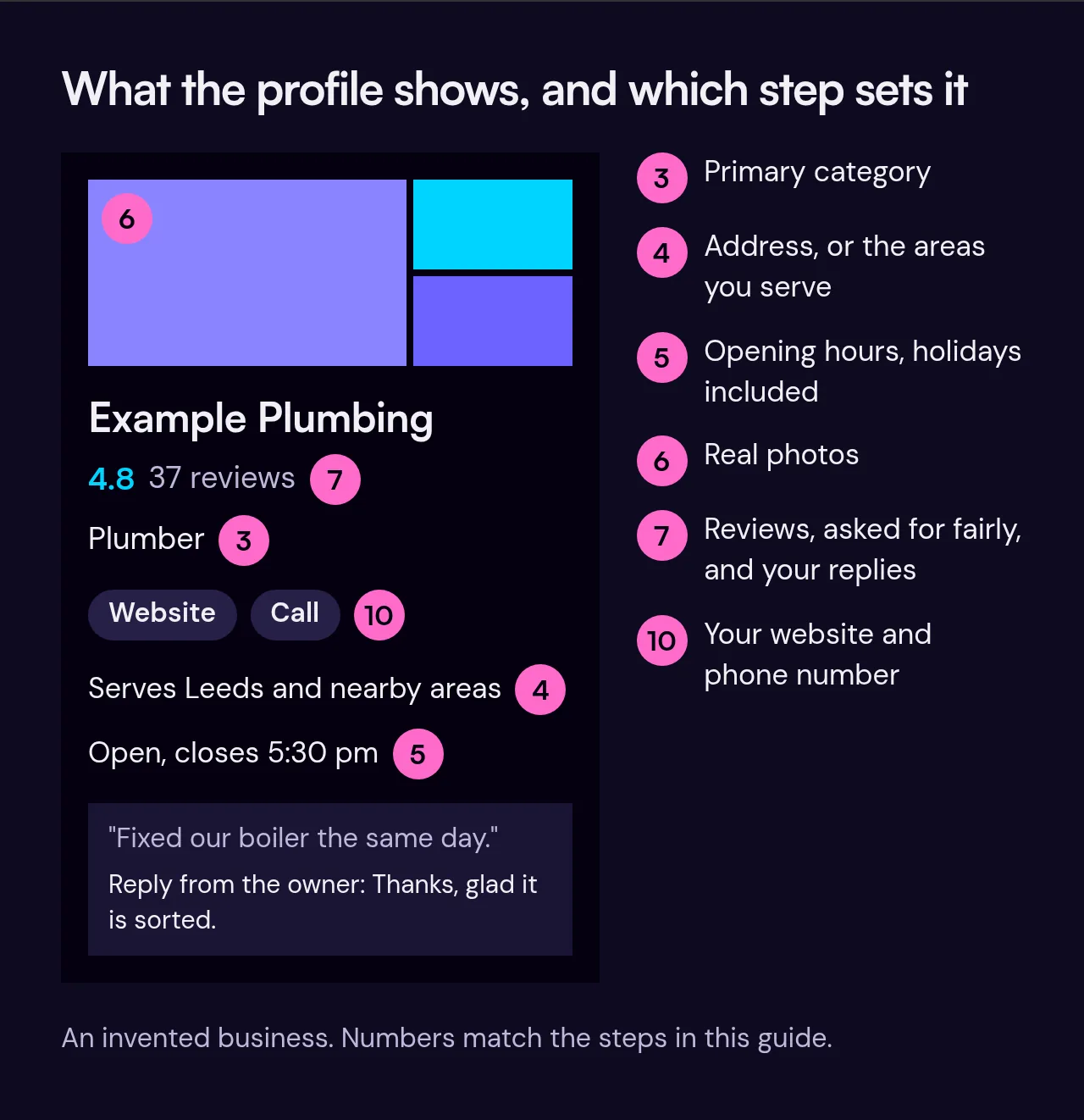
When someone searches for a local business, Google often shows a panel with the name, opening hours, reviews, photos and a phone number. That panel comes from your Google Business Profile. It is free, and for many local businesses it is as important as the website itself. Here is how to set it up and keep it in good shape.
1. Claim your profile
Go to business.google.com and sign in with a Google account. Use an account that belongs to the business and that more than one trusted person can reach, not a personal account of someone who might leave. Search for your business name. If it already appears, claim it. If not, add it.
2. Verify that it is yours
Google needs to confirm you are really the business. It offers several methods, such as a phone call or text, an email, a recorded video, a live video call or a postcard, and Google decides which ones are available for your business. You may not get a choice, so do not plan around one specific method. Follow what Google offers you. Until you are verified, you cannot manage the profile or keep its details up to date.
3. Choose the right primary category
The primary category tells Google what kind of business you are, and it carries a lot of weight. Pick the one that most closely describes your main service, not a general one. A plumber should choose a plumbing category, not "home improvement". You can add secondary categories for other things you do, but only if they are true.
4. Address, or service area
If customers visit you, show your address. If you travel to customers and do not serve them at your address, as many tradespeople do, Google asks you to remove the address and set up a service-area business instead. Then list the areas you cover, up to 20, using real places you serve. Do not list towns you do not actually work in. If you work from home, leaving the address off also keeps it private. Our page on websites for tradespeople covers more on this.
5. Opening hours
Enter your regular hours, then update them for bank holidays and any changes. Wrong hours are one of the quickest ways to annoy a customer. If you are closed for a holiday, use the special hours option so the profile says so.
6. Add real photos
Use clear photos of your premises, your team, your work and your vehicles if relevant. Real photos work better than stock images, and they show customers what to expect. Add new ones now and then, rather than all at once and never again.
7. Ask for reviews, the right way
Reviews help people decide, and Google takes them into account. The simplest approach is to ask happy customers after a job and send them a direct link to your review page. A short message such as "If you were pleased with the work, a review would help us" is enough.
Some things break Google's rules and can get reviews removed or your profile suspended:
- Paying for reviews or offering rewards for them.
- Only asking customers you expect to be happy, and steering unhappy ones elsewhere. This is called review gating.
- Writing reviews yourself, or asking staff, friends or family to do so.
Ask everyone, and accept what you get.
8. Reply to reviews
Reply to good reviews briefly and politely. For bad ones, stay calm, thank them for the feedback, state your side in a sentence or two without arguing, and offer to sort it out offline. Future customers read the replies as well as the complaints.
9. Keep your details consistent everywhere
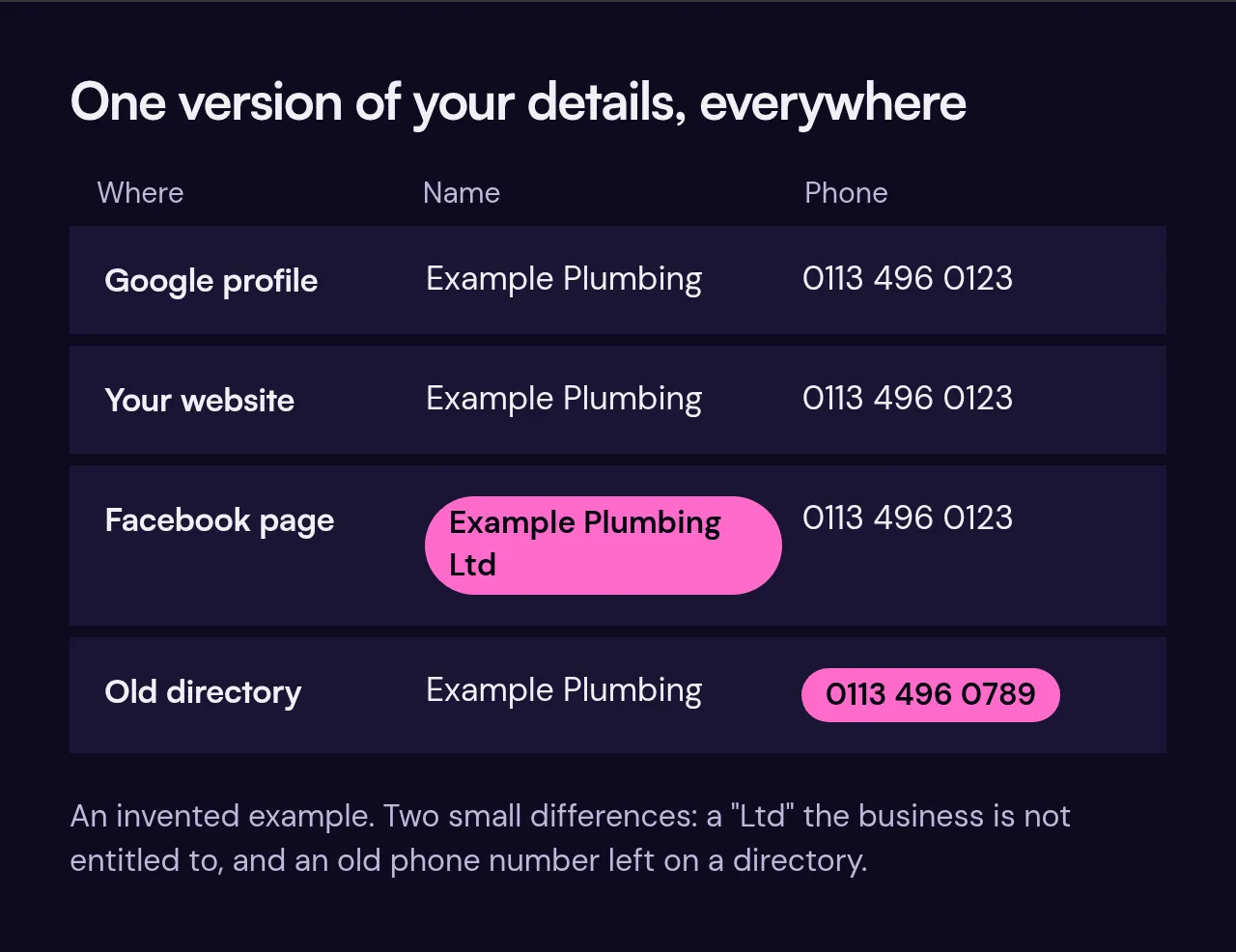
Your business name, address and phone number should match across your profile, your website, social media and any directories you appear in. Small differences, such as "Ltd" in one place and not another, or an old phone number on a directory, can confuse customers and make it harder for search engines to trust the details. Pick one version and use it everywhere. If you are not a limited company, do not add "Ltd".
10. Link it to your website
Add your website address to the profile, and make sure your site shows the same name, address and phone number. A clear page for each main service gives Google and customers something to land on. See our SEO page for how this fits together.
Keep it alive
A profile is not a one-off job. Once a month, check your hours, answer new reviews, look at any questions and add a photo. It takes a few minutes and keeps the profile accurate.
If you want help with your profile or the site that goes with it, get in touch.