FloatWebGet a quote

On this page
We build websites in Next.js, so read this knowing which side we are on. We have still tried to be fair, because the honest answer for some businesses is WordPress, and we would rather tell you that on a call than build you the wrong thing.
What each one is
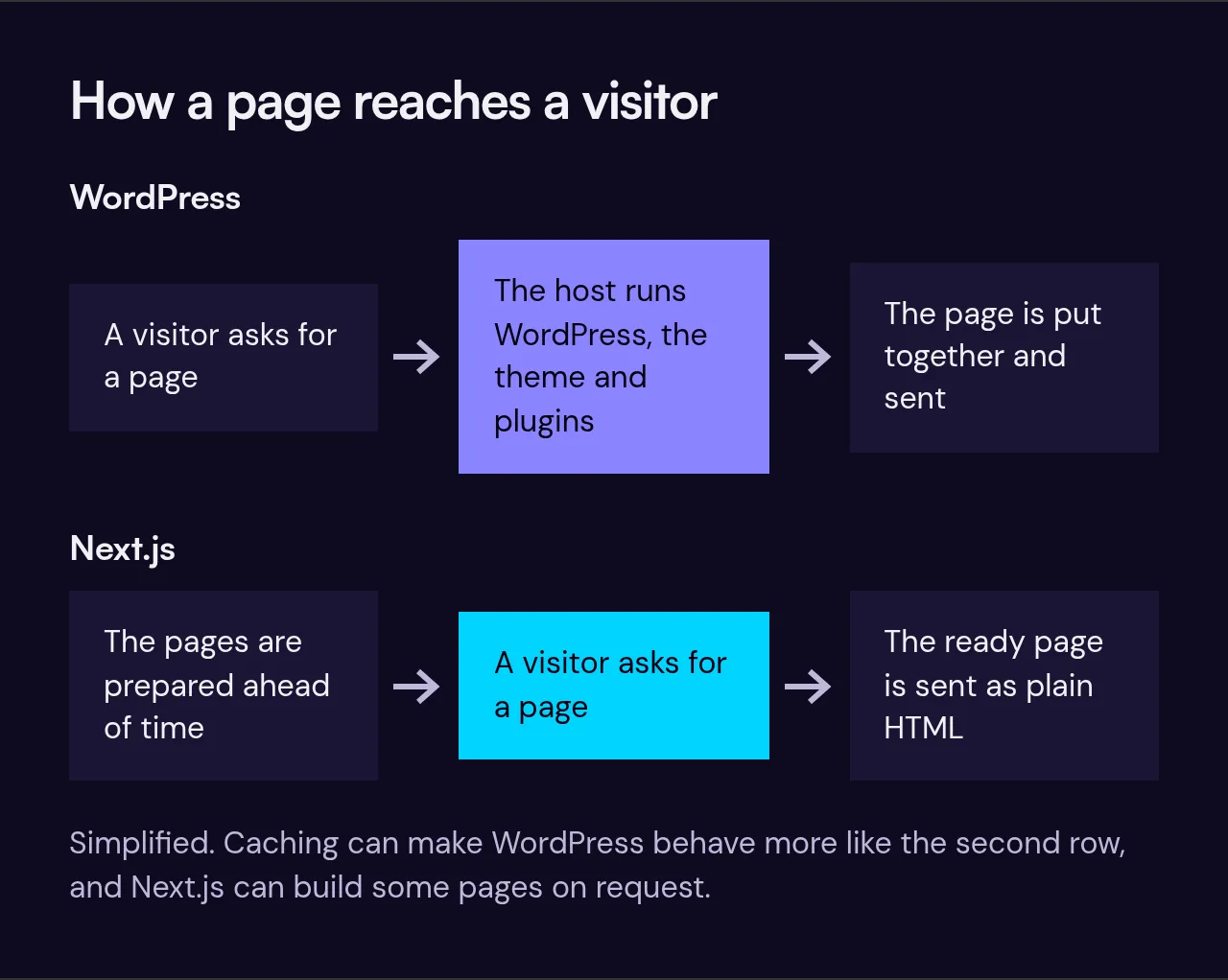
WordPress is a content management system. You install it on a web host, pick a theme for the look, and add plugins for everything else: contact forms, SEO settings, booking, a shop. You log in to one dashboard and edit pages there. It runs a very large share of the web, so almost every developer and host knows it.
Next.js is a framework for building websites and web apps in code. A developer builds the site, and the pages are usually prepared ahead of time as plain, fast HTML. The parts you change, like news, prices and photos, are edited in a separate content editor connected to the site. There are no plugins to install; a feature is either built in or not there.
Where WordPress wins
- You can add features yourself. Want a booking form on Friday? There is a plugin for it, and you can install it without calling anyone.
- Lots of people can work on it. If your developer disappears, finding another is easy and usually cheap.
- It can be cheaper to start. A theme plus a few plugins can get a decent site up for a lot less than a custom build.
- Some jobs are its home ground. Large blogs with many writers, membership sites and WooCommerce shops have years of tooling behind them.
Where Next.js wins
- Speed on a phone. Pages that are prepared in advance load quickly, and there is no stack of plugin scripts slowing them down. Google measures this, and so do your visitors.
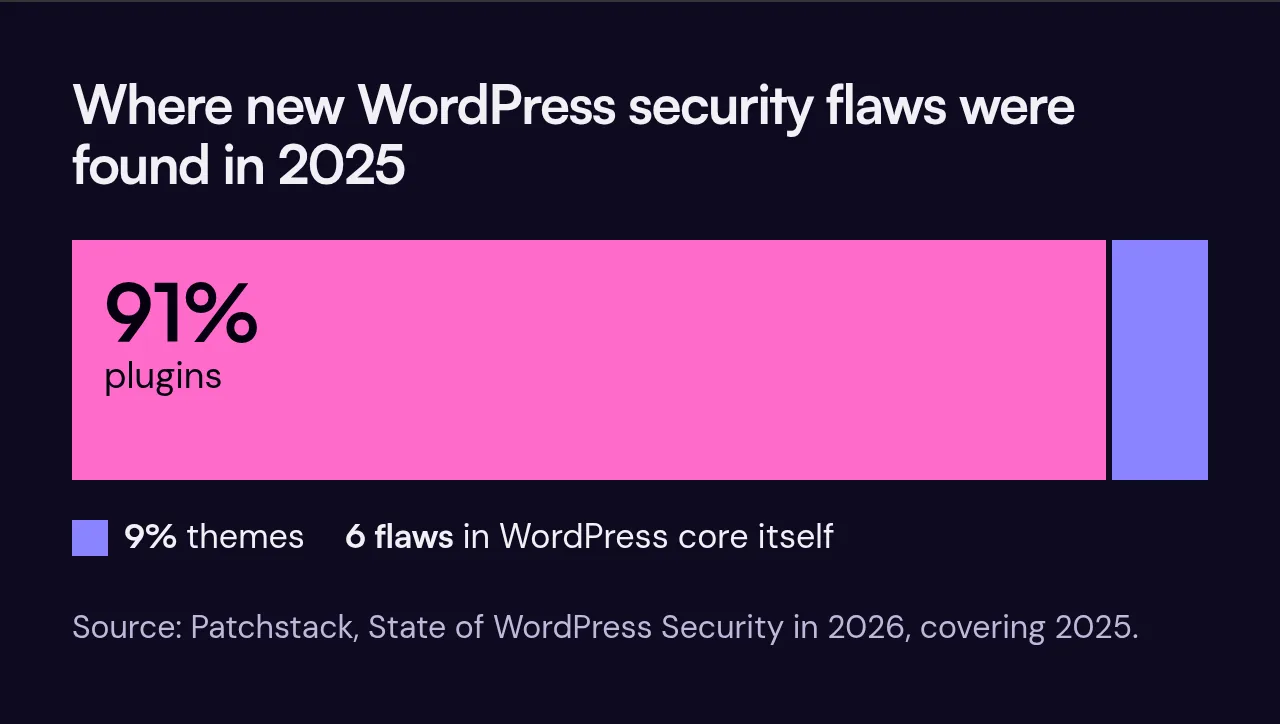
- Less to look after. Most reported WordPress security problems are in plugins and themes rather than WordPress itself. Patchstack's report on 2025 put 91% of new vulnerabilities in plugins, 9% in themes and only six in WordPress core. With no plugins, there is far less to update and far less to break after an update.
- It does exactly what you need. Because it is built for you, a quote calculator, a booking flow or a link to your stock system works the way your business works, not the way a plugin author imagined.
- It grows into an app. If the site later needs logins, a client portal or a dashboard, it is the same code, not a rebuild.
The catches with Next.js
You cannot install a new feature yourself; a developer adds it. The pool of developers is smaller than for WordPress, so it matters that the code is tidy and that you own it. And a custom build costs more up front than a theme.
We deal with the first two by writing plain code another developer could pick up in an afternoon, and by handing you the site and its code once the final invoice is paid. The third is real: see what a website costs for our full price list.
How to choose
Pick WordPress if your budget is tight, you like to tinker, you want to add features without a developer, or you already have a WordPress site that works and just needs care.
Pick Next.js if the site has to win work from search, speed on a phone matters to you, you would rather not spend time on updates, or the site needs something custom that plugins do badly.
If you are moving from WordPress, keep your search traffic by bringing old pages across with a redirect for each address. Skipping that step is the most common way a new site loses its rankings.
Questions to ask any developer
- Who owns the site and the code when the project is finished?
- What will it cost each month to host and keep updated, and who does the updates?
- If you stopped working with us, how would we move the site?
- How will we edit the pages we change most often?
Not sure which suits you? Try our cost calculator or send us a few lines. If WordPress is the better answer, we will say so.