FloatWebGet a quote

On this page
- 1. Who you are: the Electronic Commerce (EC Directive) Regulations 2002
- 2. A privacy notice: UK GDPR and the Data Protection Act 2018
- 3. Cookies: PECR
- 4. Selling to consumers online: Consumer Contracts Regulations 2013
- 5. Trading under a name that is not your own: Companies Act 2006, Part 41
- A short checklist
- This is a summary, not legal advice
Many small business owners are never told what a website has to show by law. Here is a plain-English summary of the main points for a UK business. It is not legal advice. It covers the basics, and your situation may need more, so check with a solicitor or your regulator for anything specific.
1. Who you are: the Electronic Commerce (EC Directive) Regulations 2002
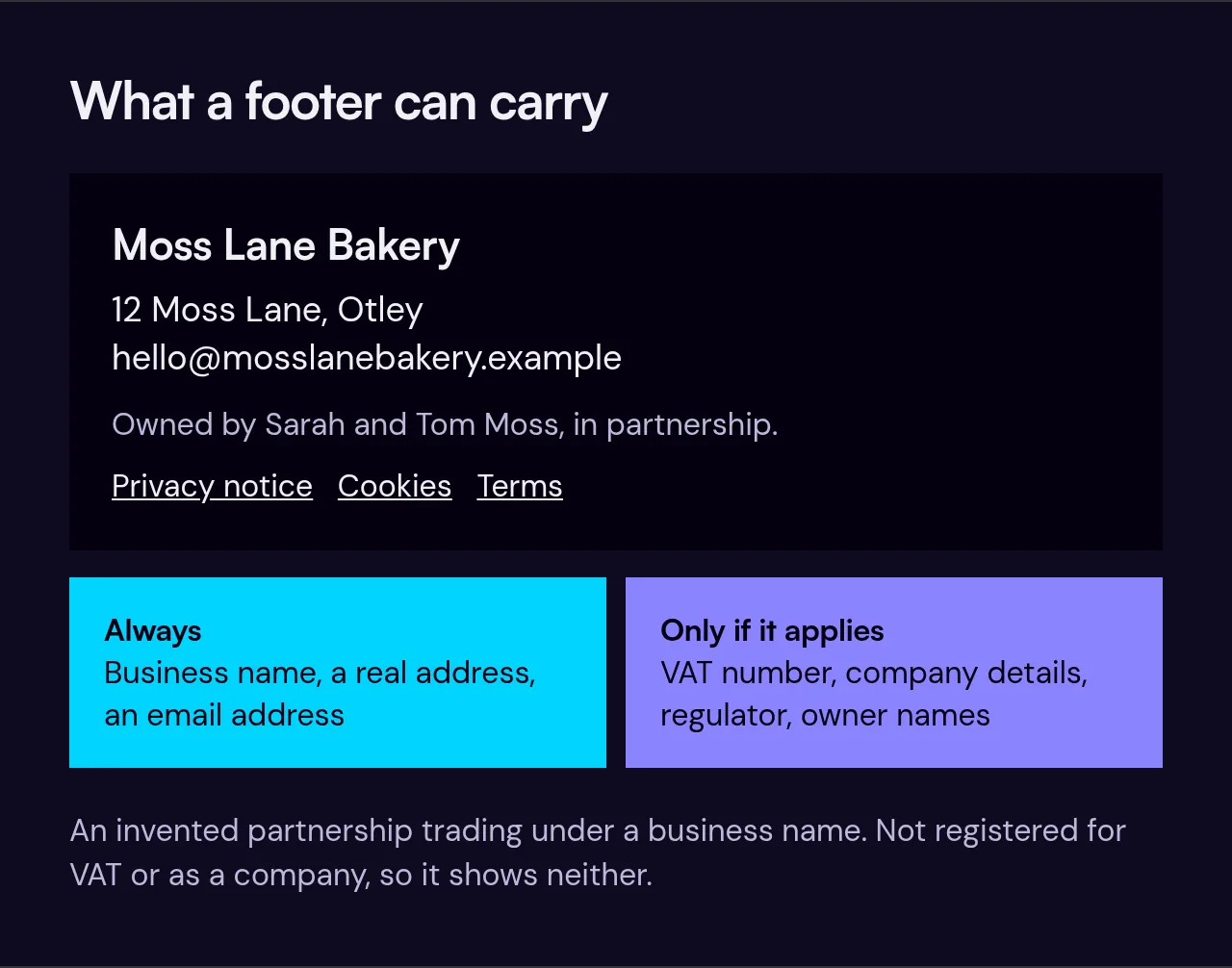
If you run a business website, these regulations expect you to make some details easy to find. At a minimum:
- Your business name.
- Your geographic address, meaning a real address and not just a PO box.
- An email address, so people can contact you quickly and directly.
Where they apply to you, you also need to show:
- Your VAT number, if you are VAT registered.
- If you are on a public trade register, such as the Companies House register, the register and your number on it.
- If your work needs authorisation, details of the body that supervises you.
- If you are in a regulated profession, the professional body you are registered with, your professional title and where to find the professional rules that apply to you.
If you show prices, they must be clear and say whether they include tax and delivery costs. You can read the wording in regulation 6.
Limited companies have a separate duty under company law to show their registered name, company number, registered office address and the part of the UK they are registered in on their website (Trading Disclosures Regulations 2015).
A common place for all this is the footer or a contact page. If you are not registered for VAT or as a company, you simply have nothing to show for those items. Do not invent them.
2. A privacy notice: UK GDPR and the Data Protection Act 2018
If your website collects personal data, you need to tell people what you do with it. That includes contact forms, newsletter sign-ups, booking forms and analytics. A privacy notice normally explains:
- Who you are and how to contact you.
- What data you collect and why.
- What legal basis you rely on.
- Who you share it with.
- How long you keep it.
- People's rights, such as seeing or deleting their data.
- How to complain, both to you and to the Information Commissioner's Office (ICO).
Many businesses also need to pay a data protection fee to the ICO each year, unless they are exempt. At the time of writing it is £52 for micro organisations (turnover up to £632,000 or no more than 10 staff), £78 for small and medium organisations (turnover up to £36 million or no more than 250 staff) and £3,763 for everyone else, with £5 off if you pay by direct debit. The ICO has a short self-assessment on its website to check whether you need to pay.
3. Cookies: PECR
The Privacy and Electronic Communications Regulations (PECR) cover cookies and similar technologies. The rule in outline:
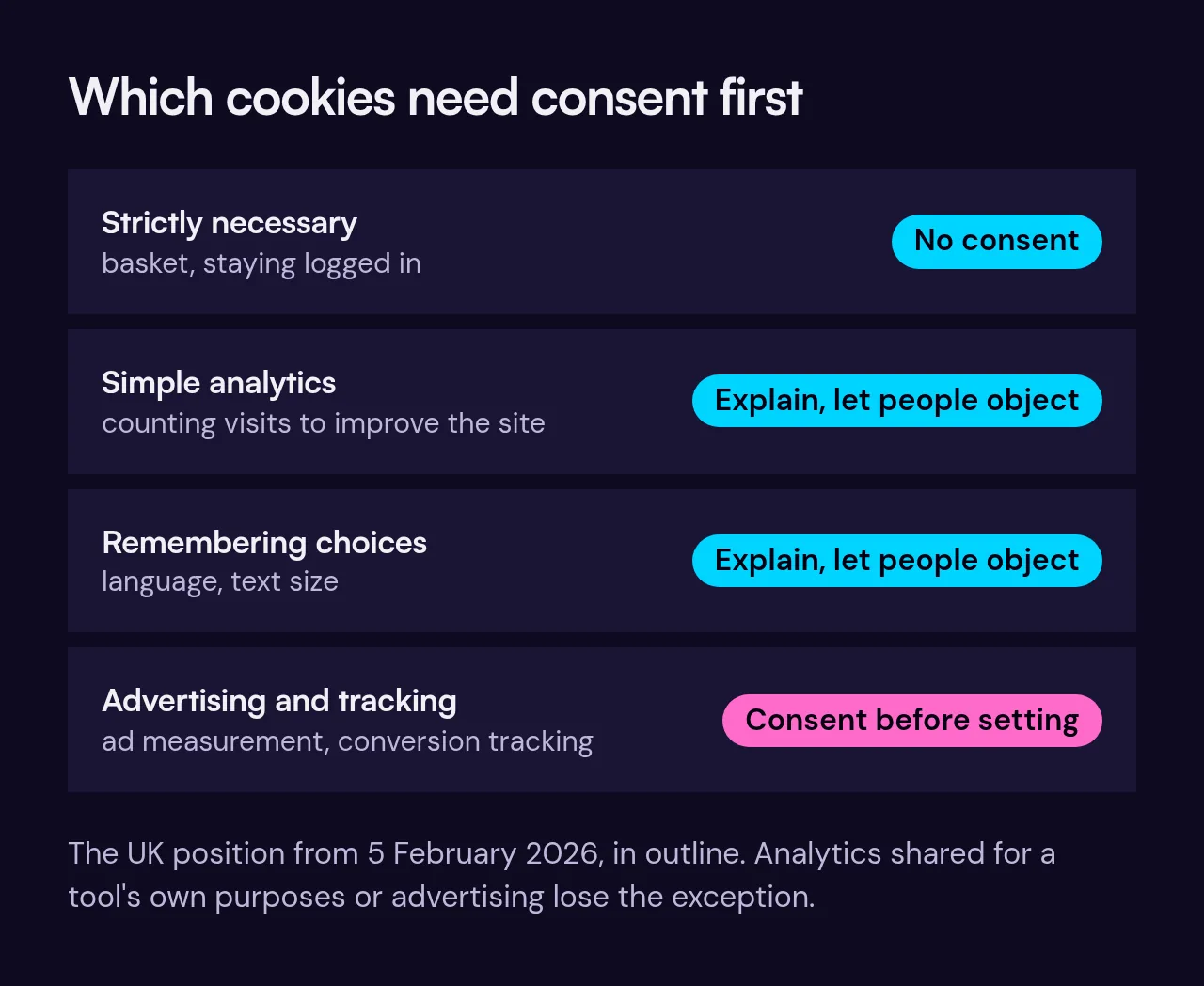
- Strictly necessary cookies, such as those that keep items in a basket or keep you logged in, do not need consent.
- Simple analytics cookies, used only to count visits and see how the site is used so you can improve it, no longer need consent since the Data (Use and Access) Act 2025 changes came into force on 5 February 2026. You must explain them clearly and give people a simple, free way to object. If a third-party analytics tool uses the data for its own purposes, or for advertising, the exception does not apply.
- Cookies that remember a visitor's choices, such as a preferred language or text size, are also exempt on the same terms: clear information and a simple way to object.
- Advertising and tracking cookies, including ad measurement and conversion tracking, still need the visitor's consent before they are set.
In practice, if you use any cookies that need consent, you need a banner that lets people accept or refuse, without setting those cookies until they agree. Whatever you use, explain what each cookie does. The ICO is the regulator and sets out the exceptions and their conditions in its guidance.
4. Selling to consumers online: Consumer Contracts Regulations 2013
If you sell to consumers at a distance, such as online or by phone, you must give clear information before they buy. That covers things like what the goods or services are, the total price including delivery and taxes, and how to cancel. For most goods and services bought at a distance, customers get a 14-day cancellation right, with some exceptions. For services, the 14 days run from the day the contract is made. For goods, they run from the day the goods arrive. If you sell online, read the regulations closely or get advice. Our ecommerce page covers what a shop needs to do.
5. Trading under a name that is not your own: Companies Act 2006, Part 41
If you are a sole trader or in a partnership and trade under a name that is not your own, the business names rules apply. In outline, you need to show the owner's name (or each partner's name) and a UK address where documents can be served. These must appear on business letters, orders, invoices, receipts and written demands for payment, on a notice at any premises customers or suppliers visit, and in writing straight away if someone you deal with asks. The law does not mention websites, but your website is a sensible place to show this too. You can read Part 41 of the Act on legislation.gov.uk.
There are also rules about the name itself. A sole trader or partnership name cannot include "Limited", "Ltd", "LLP" or "plc", cannot be offensive, and should not be the same as or too like an existing trade mark. Words that suggest a link with government or a public authority need permission first. GOV.UK covers this in its guide to choosing a business name.
A short checklist
- Business name, geographic address and email, visible on the site.
- Company details, VAT number and regulator details, only where they apply.
- A privacy notice that matches what you really collect, and the ICO fee paid if it applies to you.
- Clear cookie information, and a banner that blocks advertising and tracking cookies until consent.
- Pre-contract information and cancellation terms if you sell to consumers.
- Owner or partner names if you trade under a business name.
This is a summary, not legal advice
If you are looking for a UK web designer who builds these basics in from the start, see our UK web design page or get in touch.